SeeMySaas documentation
When buyers ask ChatGPT, Claude, Perplexity or Gemini "what's the best tool for X", someone gets recommended. SeeMySaas finds the questions where that someone isn't you, puts a content crew on closing the gap, and tracks your visibility rising, engine by engine.
The product is built for founders, not SEO experts. Every number links to an action, every action tells you why it matters, and everything the crew produces waits for your approval before it touches your site or your name.
Getting started
- Sign up free, no card. Your first 7 days include the full platform, crew included. When the trial ends, your data stays saved and you subscribe to continue.
- Tell us your site. The crew scans it, builds your business profile, maps your competitors, and generates the buyer questions your customers ask AI.
- Run your first checks. Within the first day you'll have your AI visibility baseline (which engines know you, which recommend you) and your first site health scan.
- Work the loop. Open Discover to pick a gap, send it to the crew, approve what they make, and watch Progress move.
How it fits together: Find, Do, Track
The three nav items map exactly to this loop. Discover is where work starts, Actions is where it gets done, Progress is where you see it pay off.
Discover · Questions and the gap score
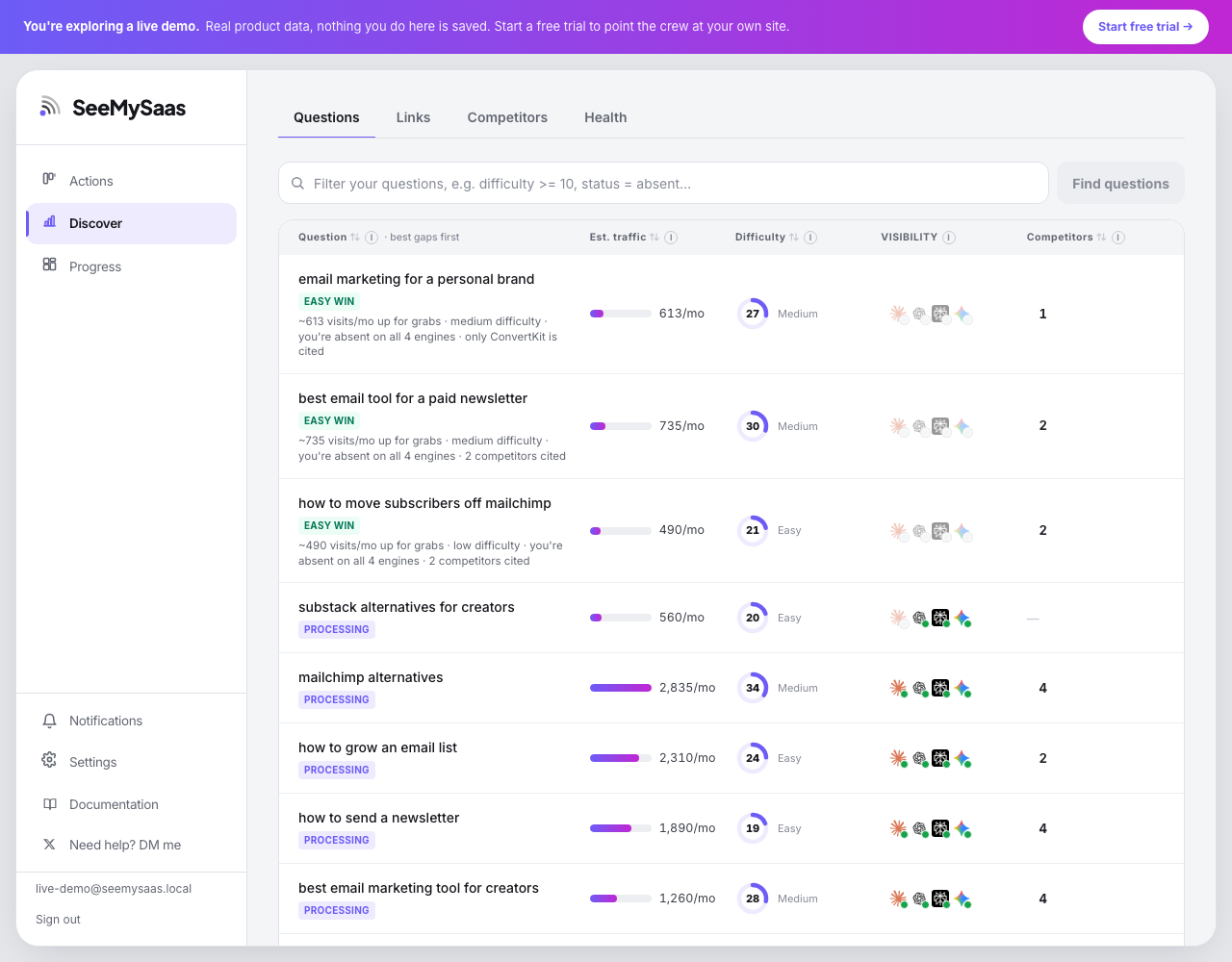
Every row is a real buyer question with four signals:
- Est. traffic: the monthly visitors up for grabs if you become the answer AI gives. Modeled from real search demand behind the question.
- Difficulty: how hard it is to get recommended for this question, 0 to 100.
- Visibility: how each of the four engines treats you today. Click the badges to see per-engine status: cites your content, recommends you, or doesn't know you yet.
- Competitors: how many rivals AI names on this question. Click the number to see who, and jump into their analysis.
The table sorts by gap score by default: traffic times ease times how absent you are, divided by how crowded the question is. The top gaps get an Easy win badge with the correlation written out, for example "~613 visits/mo up for grabs, medium difficulty, you're absent on all 4 engines, only ConvertKit is cited". Click any column header to sort your own way instead.
The search box doubles as a question finder: type a topic and hit Find questions to discover new buyer questions around it, each arriving with real search volume and difficulty, deduplicated against the questions you already track.
The question workspace
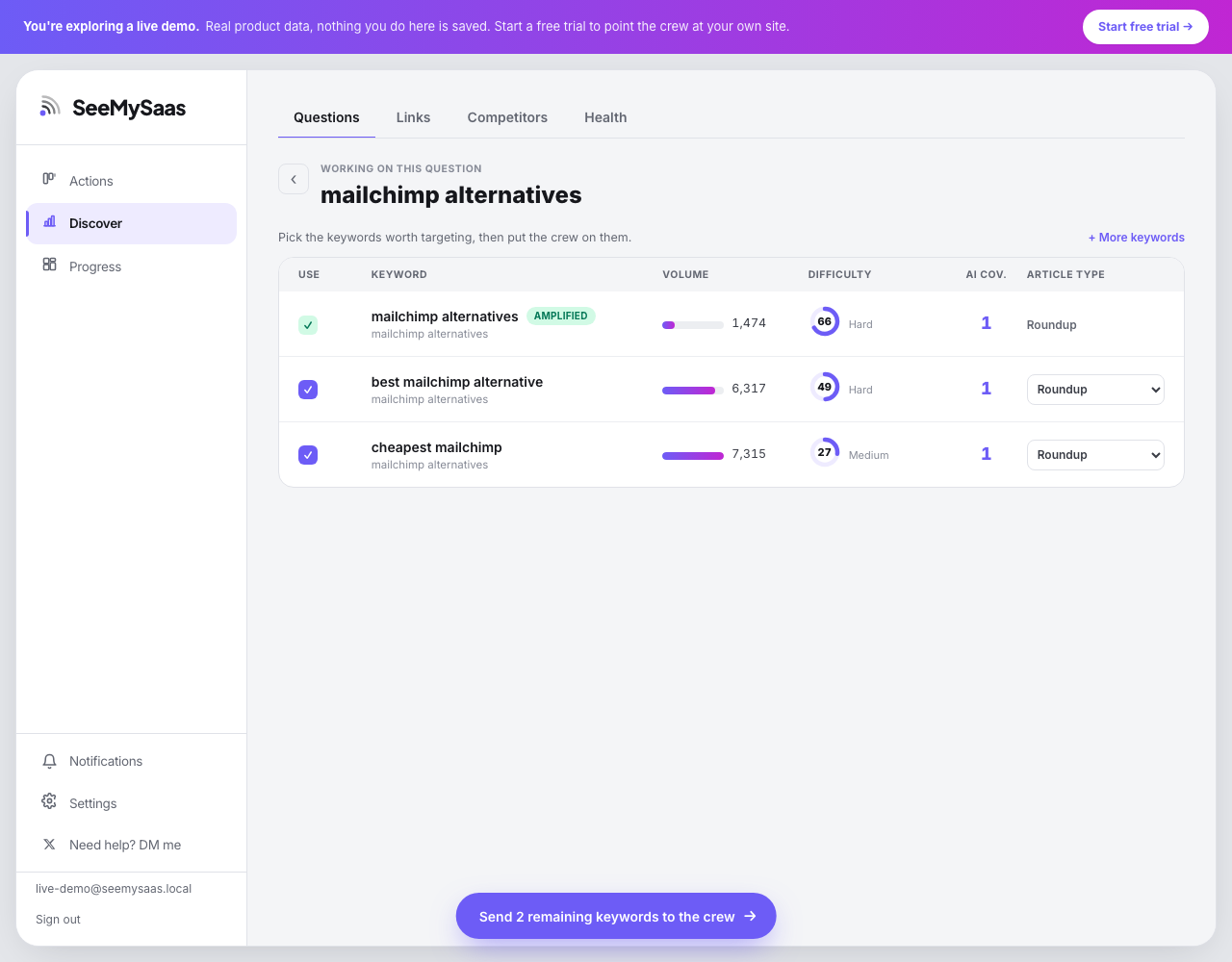
Click any question to open its workspace. From here:
- Generate keywords: the crew researches the real search terms that answer this question, each with volume, difficulty, and how many of your questions it covers.
- Pick the article type per keyword: Roundup, How-to, Comparison, Deep dive, or Guide. This tells the crew how to write it. Your choice is saved.
- Send to the crew: checked keywords join the queue. Keywords that are already published, distributed, or with the crew show their stage instead of a checkbox, so nothing gets sent twice.
- When everything is in motion, the workspace shows Track progress, which takes you to the tracking view on Progress.
The filter language
The Questions search box accepts plain text and typed filters, combined freely. Plain words match the question text; clauses filter the data:
| Filter | Meaning | Example |
|---|---|---|
difficulty | Difficulty 0 to 100 | difficulty <= 25 |
traffic | Estimated monthly traffic | traffic > 500 |
volume | Raw search volume | volume >= 1000 |
intent | Buyer intent | intent = commercial |
status | Where you stand overall | status = absent |
competitors | Rivals named on the question | competitors >= 2 |
claude chatgpt perplexity gemini | Your status on one engine | chatgpt = absent |
name | Question text match | name = "email tool" |
Status values are source (AI cites your content), mentioned (AI recommends you), absent, and unchecked. The engine cards on Progress deep-link into these filters, for example clicking the ChatGPT card opens chatgpt = absent.
Discover · Links
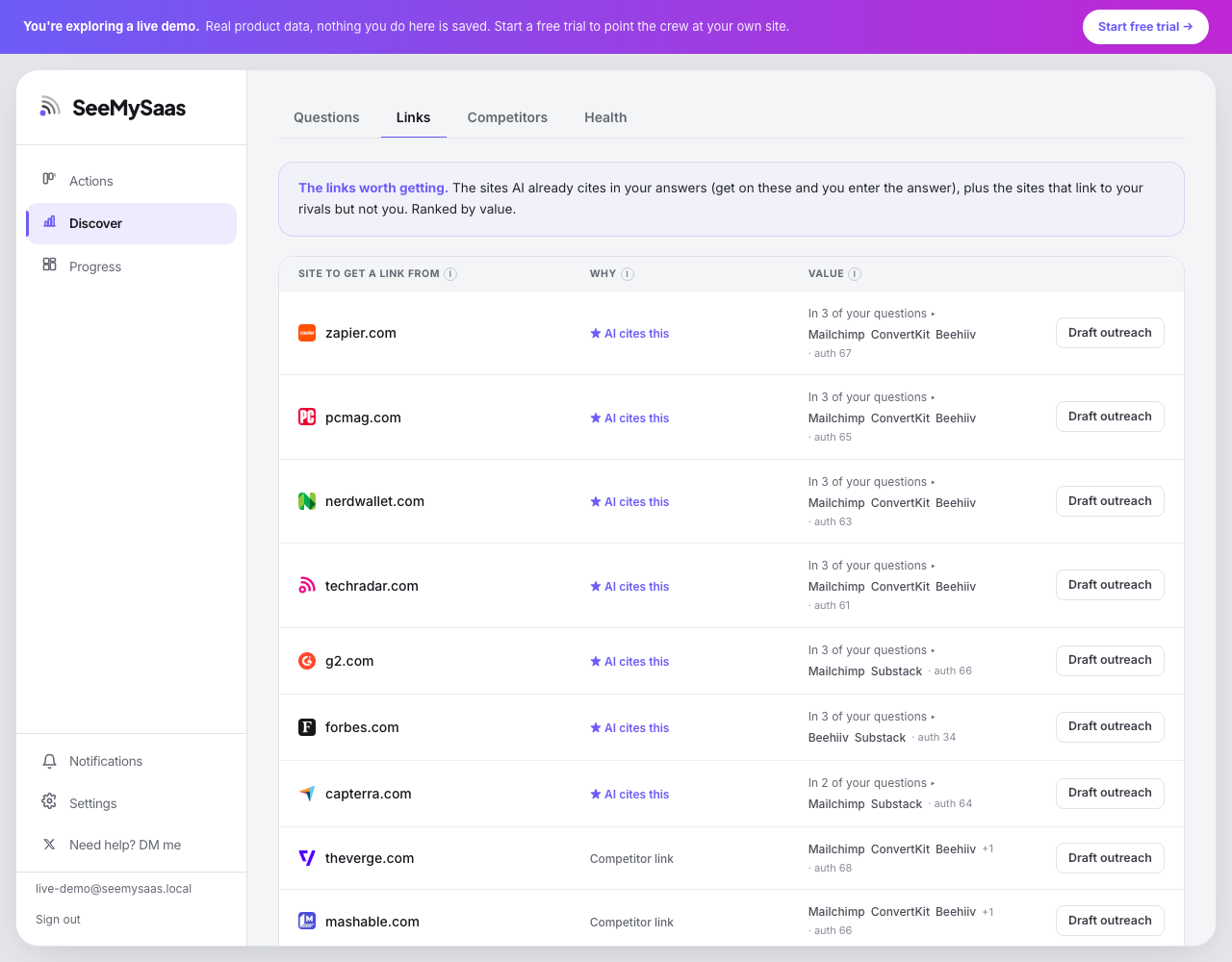
Two kinds of opportunities, ranked together:
- AI cites this: sites AI already pulls answers from on your questions. Get on these and you enter the answer. Expand a row to see exactly which of your questions the site is cited in, and click a question chip to open it.
- Competitor link: sites that link to your rivals but not you. Each shows which rivals and the domain authority.
Draft outreach hands the site to the crew: they prepare the pitch or listing and it appears in your Actions ready to send.
Discover · Competitors
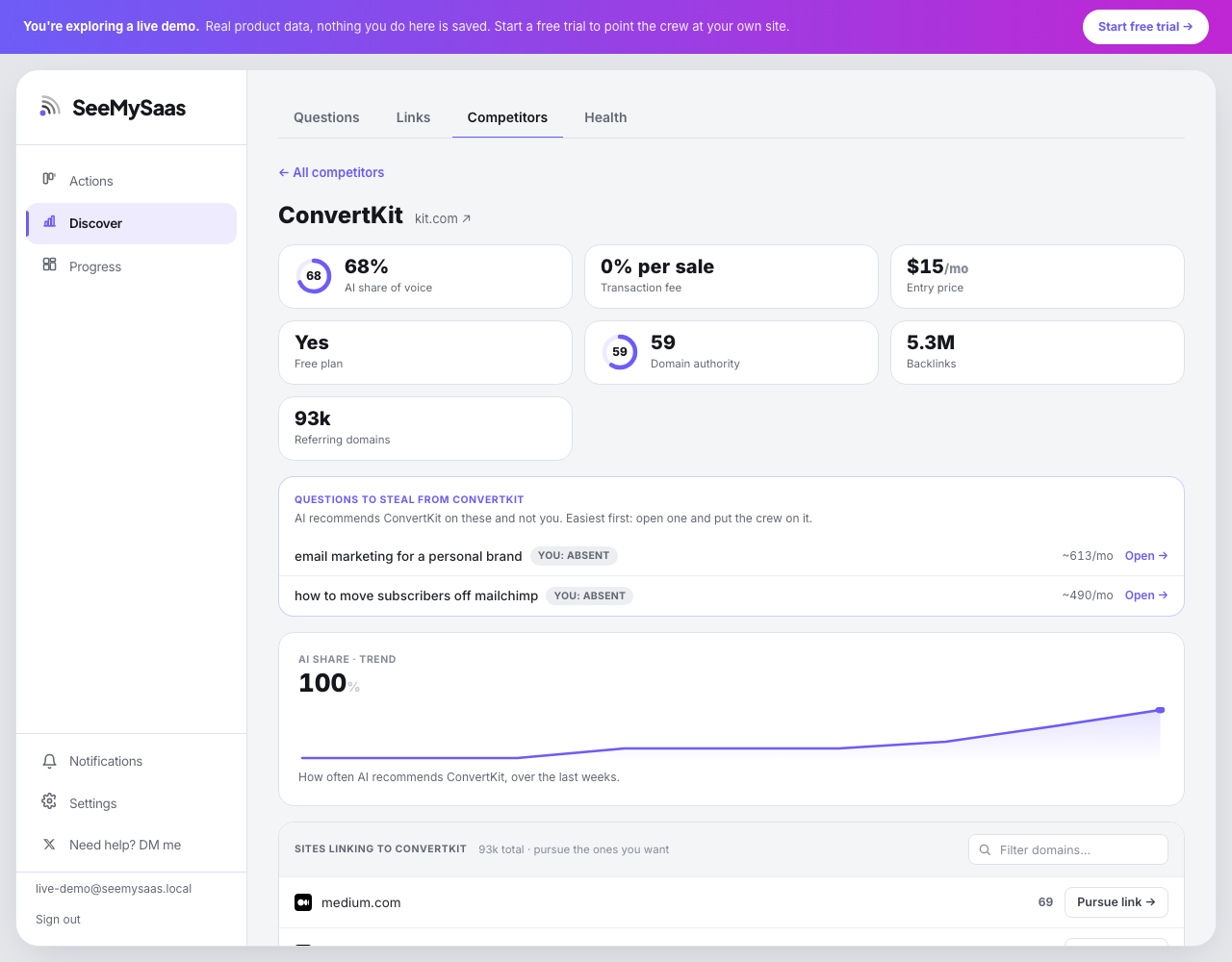
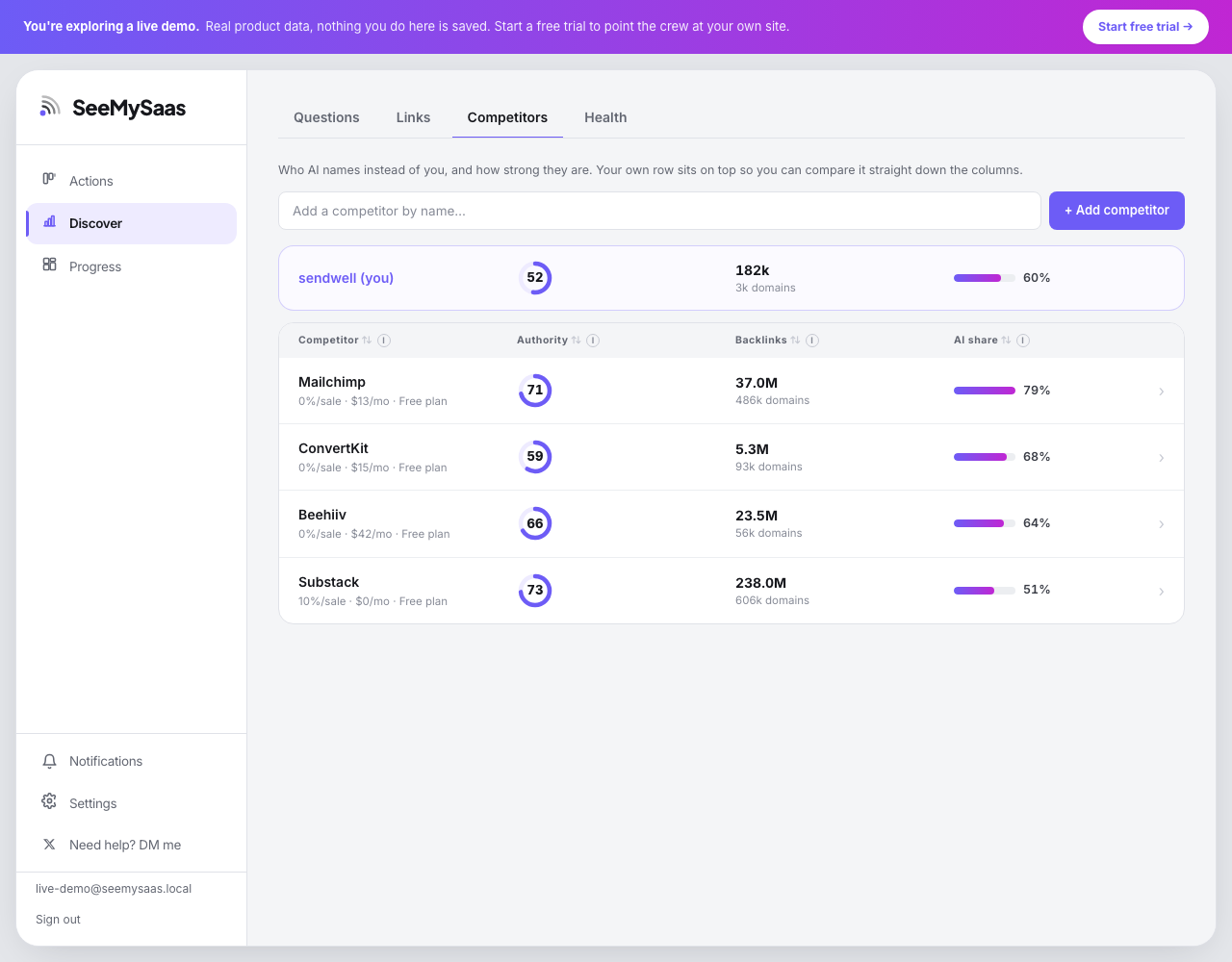
The list view benchmarks you against every rival on authority, backlinks, and AI share of voice (how often AI recommends them across your question set). Your own row is pinned on top for straight comparison. Add any competitor by name; the crew fetches and verifies their data.
Open a competitor to get:
- Questions to steal: every question where AI recommends them and not you, easiest first. Each row opens that question's workspace, so the path from "they're winning" to "crew is on it" is two clicks.
- Verified intel: pricing, free plan, transaction fees, best-for, their edge and their gaps, verified from their own pages, never guessed.
- AI share trend over the last weeks, and the sites linking to them, each with a Pursue link action.
- Links to their live ad creatives in the public ad libraries.
Discover · Health: the whole-site scan
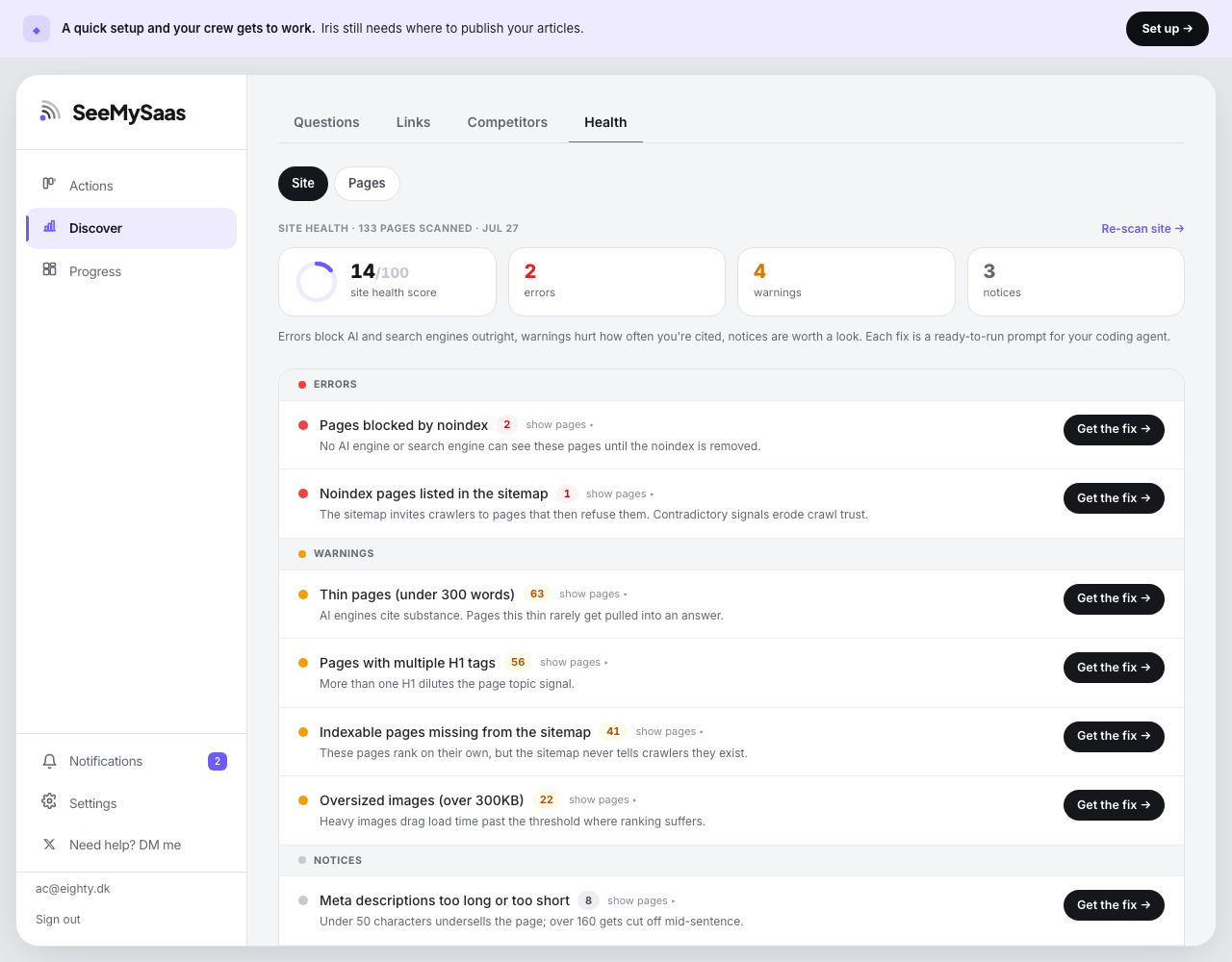
The crew crawls your sitemap and internal links (up to 200 pages) and checks everything that affects whether AI and search engines can read, trust, and cite your site. Findings come in three tiers:
- Errors block engines outright: pages hidden by noindex, noindex pages listed in your sitemap, broken internal links, redirect chains.
- Warnings hurt how often you're cited: thin pages, missing or multiple H1s, pages missing from the sitemap, missing titles or descriptions, slow pages, oversized images.
- Notices are worth a look: title and description length, nofollow directives.
| Finding | Tier | Why it matters |
|---|---|---|
| Pages blocked by noindex | Error | No AI or search engine can see these pages at all. |
| Noindex pages in the sitemap | Error | The sitemap invites crawlers to pages that refuse them. Contradictory signals erode crawl trust. |
| Broken pages linked internally | Error | Internal links point at error pages. Crawlers waste budget, users hit dead ends. |
| Redirect chains | Error | Two or more hops before the final page leak crawl budget and slow users down. |
| Indexable pages missing from the sitemap | Warning | These pages exist but the sitemap never tells crawlers about them. |
| Thin pages (under 300 words) | Warning | AI engines cite substance. Pages this thin rarely get pulled into an answer. |
| No H1 / multiple H1s | Warning | The H1 tells engines what the page is about. Zero means they guess, several dilutes the signal. |
| Missing title / meta description | Warning | The title is the strongest on-page signal; without a description, engines invent your pitch. |
| Slow pages | Warning | Pages over 3 seconds get crawled less and ranked lower. |
| Oversized images | Warning | Heavy images drag load time past the threshold where ranking suffers. |
| Title / description length | Notice | Too short wastes the signal, too long gets truncated in results. |
| Nofollow pages | Notice | Link equity stops dead. Fine if intentional, costly if not. |
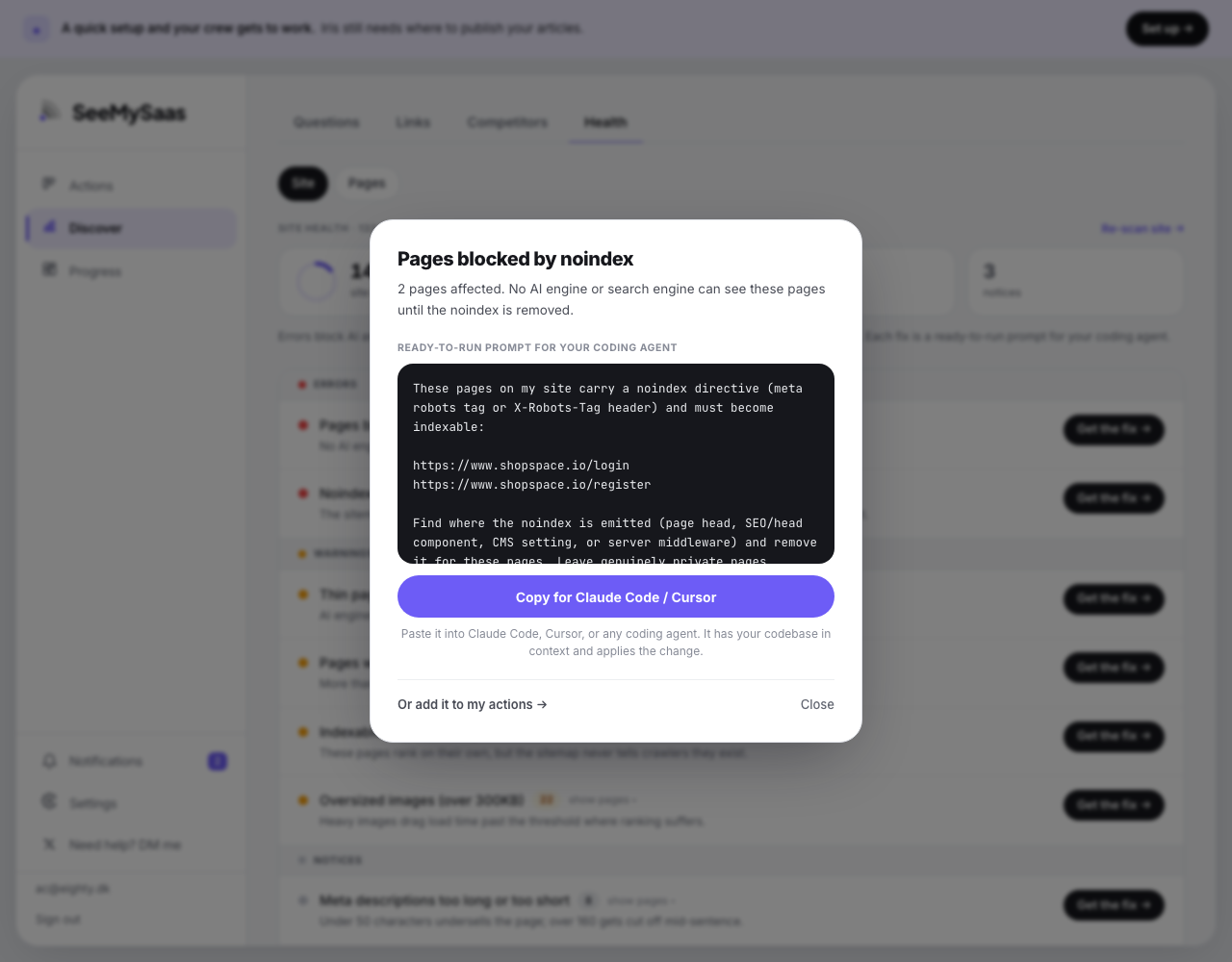
The crew can't edit your code, so it does the next best thing: Get the fix opens a prompt written for your coding agent (Claude Code, Cursor, or any other) with the exact affected URLs included. Copy, paste into your agent, done. Or add it to your Actions to handle later. The health score is the share of your pages affected, weighted by severity, and you can re-scan after every deploy.
Page health and "Fix this page"
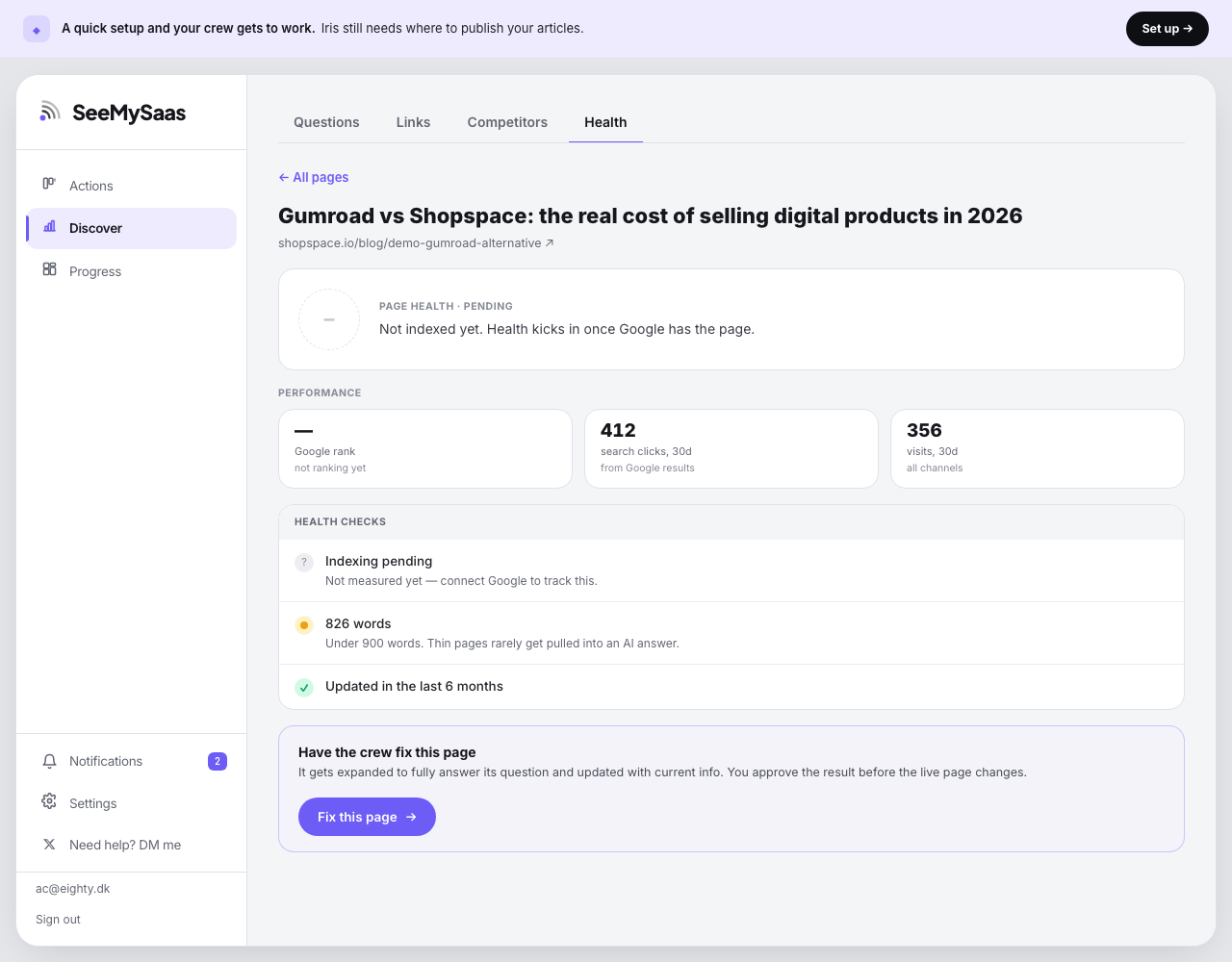
The Pages sub-view lists every published page with its Google rank, clicks, and indexation. Open one for its health checks: indexed in Google, enough depth to get cited (900+ words), and updated recently enough to stay the current answer.
When a page fails fixable checks, Fix this page puts the crew on it: the page gets expanded to fully answer its question and refreshed with current information. You approve the result before the live page changes, always.
Do · Your daily actions
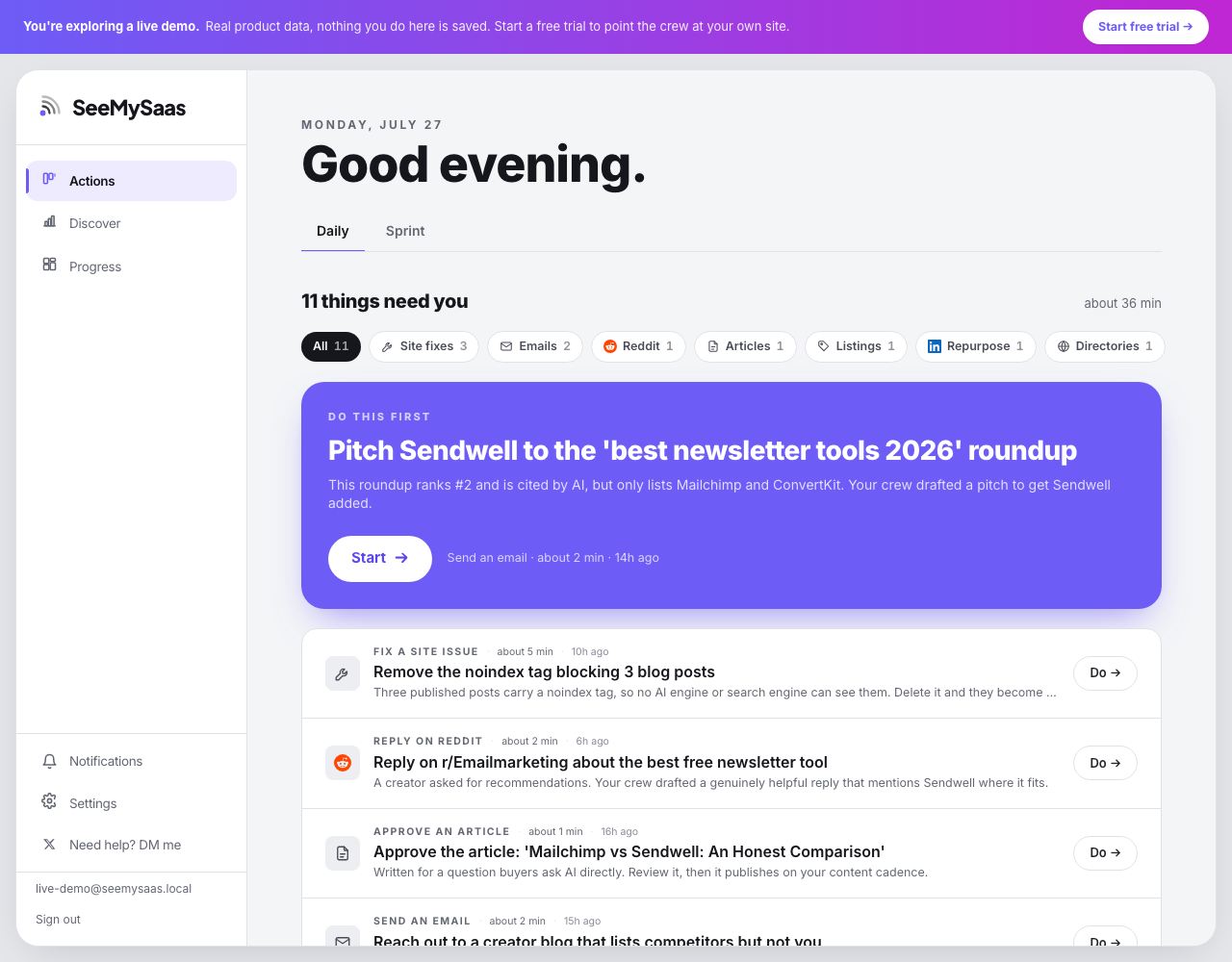
Actions is your working list. The crew prepares each item as far as it can, then hands you the last step, usually a paste, a click, or an approval. The header estimates total time so you know what you're committing to. The Sprint tab holds bigger, less frequent pushes; Daily is the routine.
Why the last step is yours: replies, listings and outreach go out under your name, on platforms that ban automation, to people who can tell. You stay the sender; the crew stays the writer. That's what keeps it authentic and safe.
Every action type
| Action | What the crew prepared | What you do |
|---|---|---|
| Approve an article | A full draft written for one of your target questions, reviewed by the crew's editor first. | Read it, edit anything inline, approve. It publishes on your content schedule. |
| Fix a site issue | The exact change plus a ready-to-run prompt for your coding agent. | Copy the prompt into Claude Code or Cursor, or apply the steps by hand. |
| Reply on Reddit | A relevant thread where buyers are asking, and a genuinely helpful drafted reply that mentions you where it fits. | Review, adjust to taste, post it from your account. |
| Answer on Quora | A high-traffic question and a thorough drafted answer that positions you among the real options. | Review and post. |
| Comment on LinkedIn / Reply on X | A drafted reply to a relevant conversation. | Review and post from your account. |
| Send an email | An outreach pitch, for example to a roundup that ranks for your question but doesn't list you yet. | Send it from your inbox. |
| Get listed / List on a directory | The listing fields written out: name, tagline, description, ready to paste. | Open the directory, paste each field, submit. |
| Repurpose to LinkedIn / Import to Medium / Post on social / Pin on Pinterest | Your published article reshaped for the channel, first line tuned as the hook. | Post it. |
| Ask for a review | A review request for the comparison sites AI cites. | Send it to a happy customer. |
| Set up | A connection or configuration step the crew needs, for example connecting Google Search Console. | Follow the steps once. |
Track · The Progress page
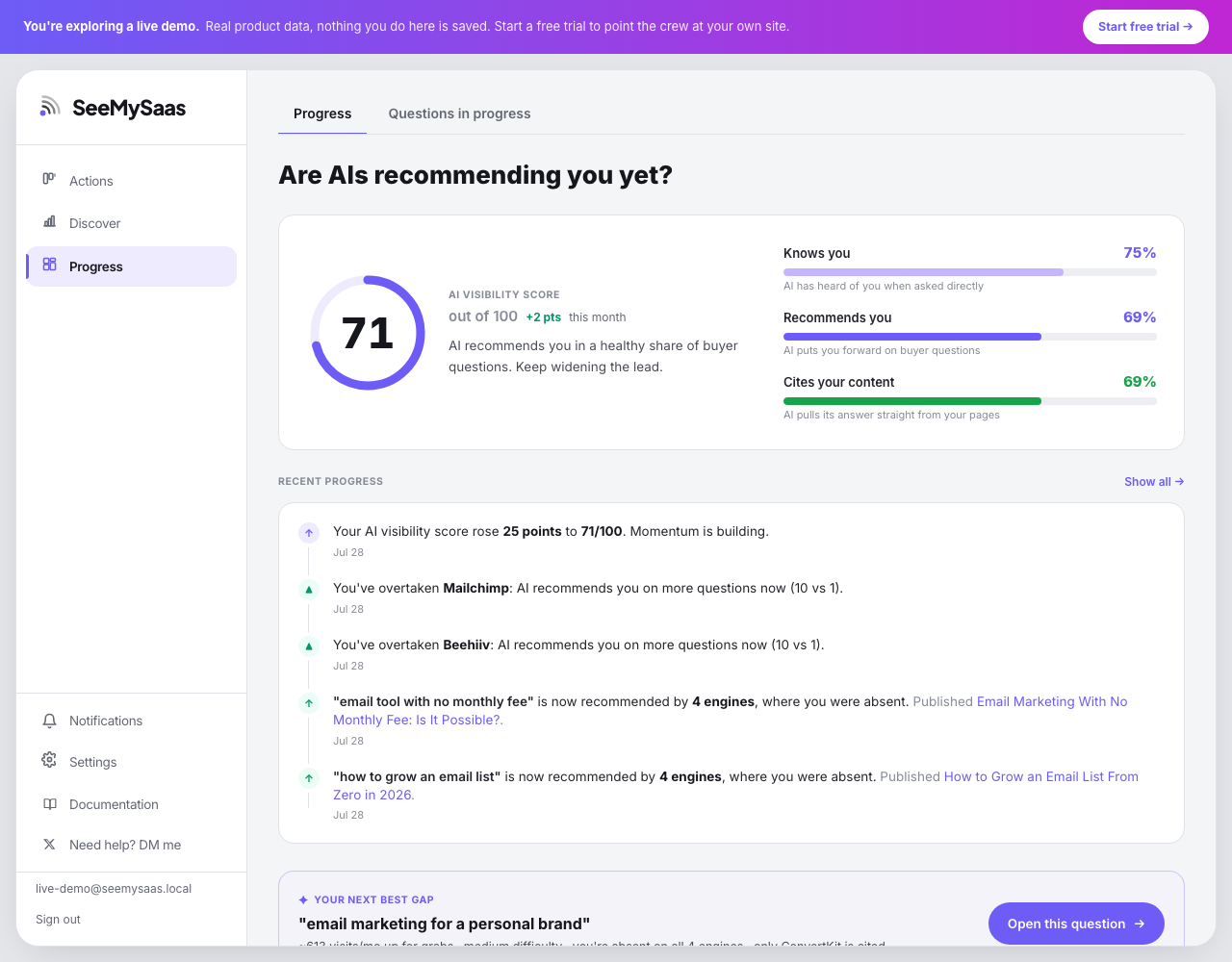
Progress answers one question: are AIs recommending you yet?
- AI visibility score (out of 100) blends how many engines know you exist with how often they actively recommend you, recommendation weighted heavier. The three dials next to it break that down: knows you, recommends you, cites your content.
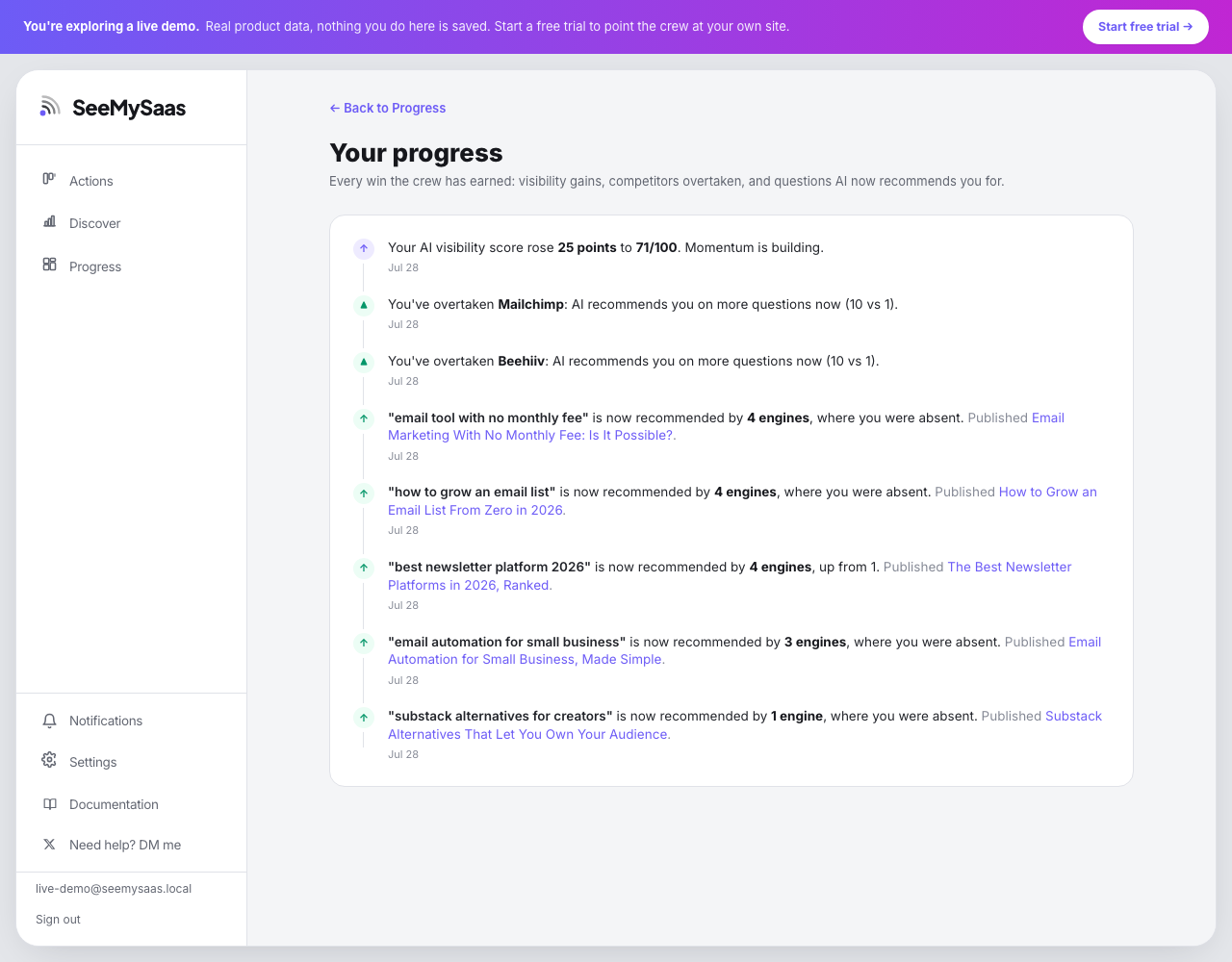
- Recent progress is a timeline of wins: score points gained, competitors overtaken, and questions where AI now recommends you, each linked to the article that did it. Show all opens your full history.
- Your next best gap is the same ranking Discover uses, surfaced here so the dashboard always hands you the next move. One click opens the question's workspace.
- Visibility by engine: one card per engine. Click any card to see the exact questions that engine doesn't recommend you on yet.
- Below: your visitor trend, the score trend, how often AI cites your pages as the source, competitor movement this week, and your complete content performance list. Every page row clicks through to its detail.
Track · Questions in progress
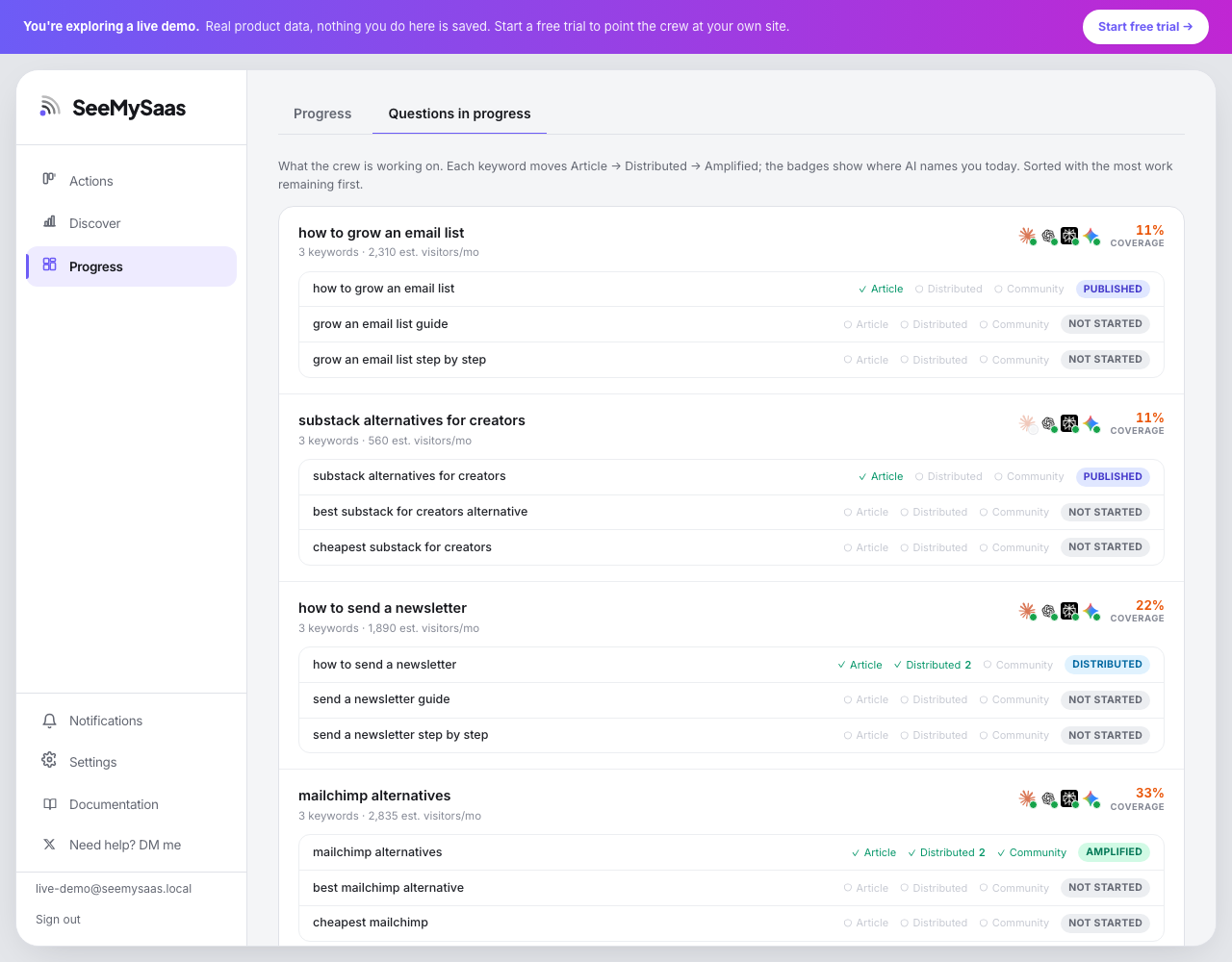
The second tab on Progress is the worklist: every question you've sent to the crew, sorted with the most work remaining first. Each keyword moves through three stages:
- Published an article targeting it is live on your blog
- Distributed pushed to your channels; the number shows how many
- Amplified also answered in community threads that AI reads
The percentage on each card is coverage: how much of that pipeline is done across the question's keywords. Click any question to open its workspace.
Connect your blog · the publishing endpoint (for developers)
If you'd rather build the endpoint yourself than paste our AI prompt, here is the whole contract. SeeMySaas publishes by sending one HTTP request per article to a URL you provide in Settings → Publishing.
The request. POST to your endpoint with Content-Type: application/json. If you set an auth header in Settings we send it verbatim (either as Header-Name: value, or a bare token which we send as Authorization: Bearer <token>). The body:
{
  "title": "The 7 best Semrush alternatives, tested",
  "slug": "best-semrush-alternatives",
  "body_md": "Full article as Markdown…",
  "meta_description": "150-char summary for the page's meta tag",
  "byline": "your brand",
  "hero_image_url": "https://…jpg or null",
  "published_at": "2026-07-29T12:00:00Z"
}
Your endpoint must:
- Handle a probe first: when the body contains
"probe": true, respond 2xx and save nothing. Settings uses this to validate the connection. - Be idempotent on
slug: the same slug twice means update, not duplicate. - Render each article as a real, server-rendered page at a stable public URL, we assume
/blog/<slug>. AI crawlers mostly do not run JavaScript, so the content must be in the HTML. - Respond with any 2xx on success. 401/403 tells us the auth header is wrong, 404 that the URL is wrong.
That's the whole integration: one route, JSON in, page out. Test it from Settings → Publishing with the validate button, it sends the probe and shows you exactly what came back.
Connecting Google (Search Console + Analytics)
Connecting Google turns estimated numbers into real ones: your actual rankings, clicks and index status from Search Console, and your real visitors from Analytics. The crew also reads both to learn which articles convert and double down.
One connection, two pickers. In Settings → Google you sign in once with the Google account that owns your site's data, then pick your Search Console site and your Analytics property. If your own site is in the list, we select and save it for you automatically. Changes save as you pick them.
If your site is not in the Search Console list: it is not verified in that Google account yet. Open Search Console, choose Add property, enter your domain and verify via the DNS record it gives you. Then return to Settings and refresh the list.
If the Analytics list is empty: the account has no GA4 property for your product yet. Two steps:
- Create the property: Google Analytics → Admin → Create → Property, then add a web data stream for your domain. Copy the Measurement ID (starts with G-).
- Install the tag on your site: paste Google's gtag snippet with that ID into your site's
<head>. This part is essential: the property only reports what the tag collects, connecting an untagged property shows zero visitors forever.
Data starts flowing within a day. Search Console history backfills on its own; Analytics counts from the day the tag went live.
Behind the scenes · Your AI agents
How an article ships
If a draft fails review, the crew fixes it itself: the brief is re-verified against live sources and the article rewritten, up to two full rounds. You only see a flagged draft when two grounded rounds genuinely couldn't settle it, with the objections listed so you can decide.
The same gate applies to refreshes: when a page is expanded or updated, the new version goes through review and then your approval before the live page changes in place.
Trial and billing
- The trial is 7 days of the full platform, crew included, no card required. It starts the moment your account is created.
- Add a card during the trial and nothing changes: you're charged only when the trial ends, and the crew never pauses.
- No card by day 7: everything you found is kept, and your account waits for you. Subscribe to continue where you left off.
- If a payment fails on an active plan, you keep access for a short grace period while we retry, with a banner prompting you to update your card.
- The plan is a flat $99 monthly subscription. No usage tiers, no per-article charges.
Getting help
The fastest way to reach us is the Need help? DM me link in the app sidebar, which goes straight to the founder. Every screen also carries small info marks next to numbers and columns; hover or tap them for a plain-language explanation of exactly what you're looking at.